

Interactive Aviation Maps
Navigate with confidence using CaptainVFR's detailed aviation maps featuring real-time GPS tracking, airspaces, airports, and navigation aids
15 min read
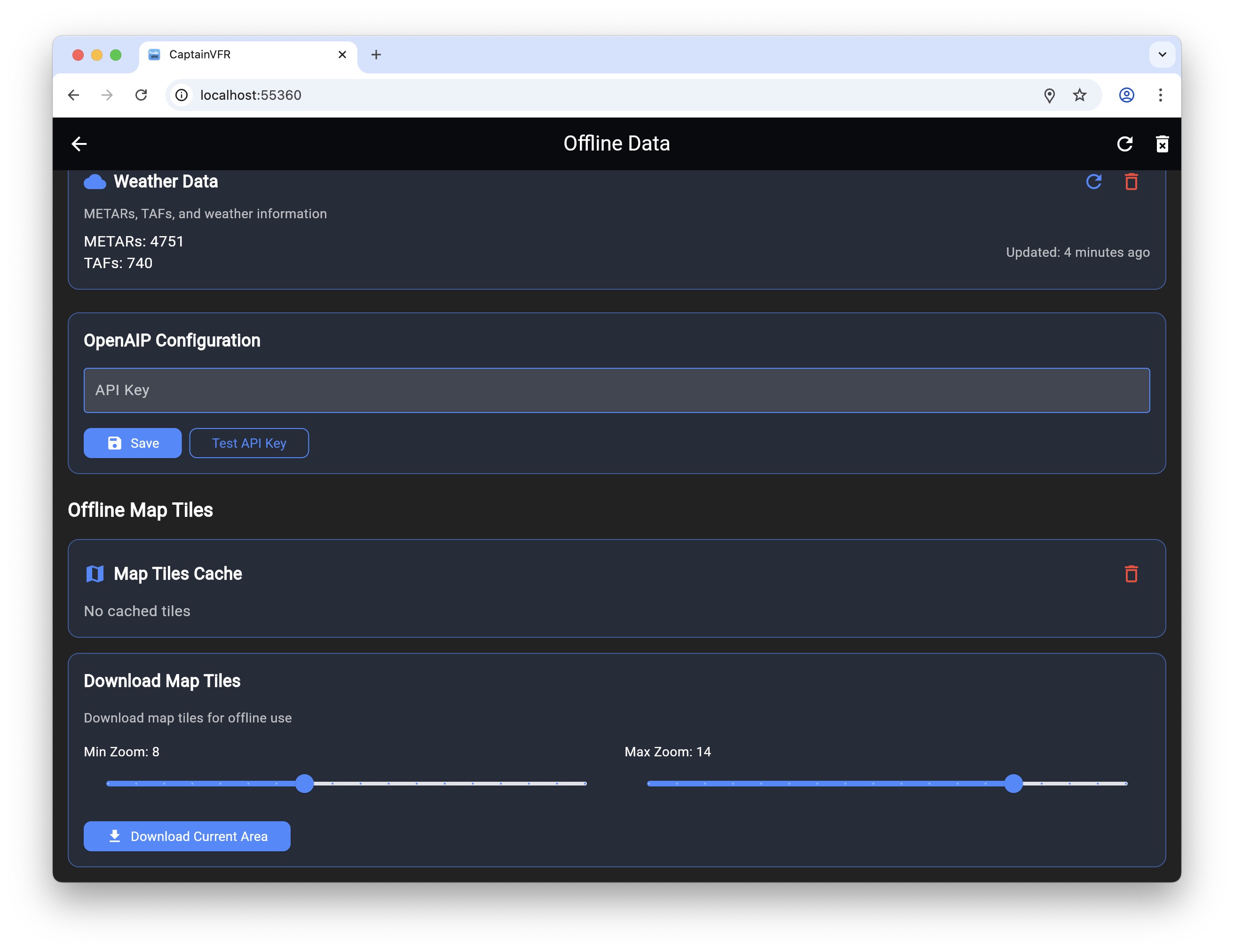
Download maps and aviation data for use without internet connection, ensuring full functionality even in remote areas
Internet connectivity is unreliable at altitude, non-existent in remote areas, and expensive when roaming internationally. Yet aviation data is too critical to depend on constant connectivity. CaptainVFR is designed from the ground up for offline operation, with comprehensive data caching, intelligent pre-loading, and full functionality even when you’re completely disconnected.
Plan flights, navigate routes, check weather (cached), review NOTAMs (cached), access documents, run calculators, and use checklists—all without internet. The app downloads and caches everything you need before you fly, then operates independently during flight. When connectivity returns, it syncs changes and updates cached data automatically. This offline-first architecture ensures CaptainVFR works reliably whether you’re flying over the Rockies, crossing the Atlantic, or operating from a remote bush strip.
Download detailed aviation maps for any region and use them without internet connectivity
Beyond maps, CaptainVFR automatically caches all the data you need for safe flight operations. The system learns your flying patterns and pre-caches data for airports you frequent, routes you fly regularly, and areas you operate in. This intelligent caching happens in the background when you’re connected, ensuring offline data is ready when you need it.
Weather data is cached automatically when you check conditions, with clear age indicators showing how current the data is. NOTAMs are cached for airports and routes you’ve viewed, remaining accessible offline for reference. Airport information including frequencies, runway data, and services is cached for quick offline access. Your flight plans, aircraft profiles, documents, and checklists are always stored locally and available offline.
Every essential feature works without internet connectivity
Before departure, CaptainVFR helps you ensure all necessary data is cached for offline use. The pre-flight data check reviews your flight plan and identifies any data that should be downloaded—maps along your route, weather for departure and destination, NOTAMs for airports you’ll use, and airport information for alternates.
A single tap initiates automatic download of all recommended data. The system prioritizes critical data (weather, NOTAMs, airport info) over nice-to-have data (satellite imagery, detailed terrain), ensuring you get the most important information first if bandwidth is limited. Progress indicators show download status, and you can cancel or pause downloads if needed.
For pilots who fly the same routes regularly, saved flight plans can have associated data packages that download automatically. Create a flight plan for your regular cross-country route, and the system remembers to cache all relevant data whenever you load that plan. This automation ensures you’re always prepared without manual data management.
Control what's cached, monitor storage usage, and manage offline data efficiently
For pilots who fly in specific regions, CaptainVFR offers regional download packages that include everything needed for that area. Download a complete state or country package, and get all maps, airspace data, airport information, and navigation aids for that region in one download.
Regional packages are optimized for size and include only relevant data. Ocean areas are automatically excluded (no need to download map tiles for the Pacific Ocean), and data density matches the region (more detailed data for busy areas, less for remote regions). This optimization keeps download sizes manageable even for large regions.
Popular regional packages include complete US states, European countries, Canadian provinces, and Australian states. Custom regions let you define your own area—draw a box around your typical flying area and download everything within it. This flexibility ensures you can cache exactly the data you need without wasting storage on areas you’ll never fly.
Optimized for smooth operation without internet connectivity
When internet connectivity is available, CaptainVFR synchronizes seamlessly between offline and online operation. Changes made offline—new flight plans, updated aircraft profiles, completed flights—sync to the cloud automatically when you reconnect. The system uses intelligent conflict resolution to handle cases where you made changes on multiple devices while offline.
Synchronization is bandwidth-efficient, transferring only changes rather than entire datasets. Compression reduces data transfer sizes, and the system adapts to connection quality—using full-speed sync on Wi-Fi but throttling on cellular to preserve data allowances. You can configure sync preferences to use Wi-Fi only, preventing unexpected cellular data charges.
CaptainVFR’s comprehensive offline capabilities ensure you’re never without critical aviation data, regardless of connectivity. From remote bush flying to international travel, from mountain operations to oceanic crossings, the app works reliably without internet. Pre-downloaded maps and aviation data, intelligent caching, full offline functionality, and seamless synchronization create an experience that’s actually better than apps that require constant connectivity. Fly anywhere, anytime, with confidence that CaptainVFR will work when you need it.
Explore our comprehensive library of articles, guides, and tutorials to deepen your understanding of key concepts and stay up-to-date with the latest developments.
Navigate with confidence using CaptainVFR's detailed aviation maps featuring real-time GPS tracking, airspaces, airports, and navigation aids
CaptainVFR July 25 update simplifies OpenAIP integration by removing API key requirements and significantly improves offline capabilities for reliable flight pl...
Maintain your pilot logbook digitally with automatic flight imports, comprehensive entry management, and easy export options for official records